SMS Consent Flow
Last updated: 8 July 2026
This page documents, publicly and without login, exactly how consent works for Rynger’s SMS assistant — who receives messages, the in-app opt-in step every text task requires, and the disclosures each message carries. It exists so carrier and campaign reviewers can verify the flow that normally sits behind our sign-in.
Who sends and receives these messages
Rynger is a personal assistant. An account holder signs up at rynger.ai (agreeing to the Terms of Service and Privacy Policy), and can then ask Rynger to send SMS on their behalf to a business they already have a relationship with (their clinic, restaurant, or service provider) to carry out a specific task — scheduling, confirming, or asking a question. Messages are conversational and transactional. Rynger sends no marketing content and is not for texting personal or consumer contacts.
The opt-in flow, step by step
- Sign-up: the account holder creates an account at rynger.ai and accepts the Terms of Service and Privacy Policy.
- Task creation: in the app, the account holder describes the task, enters the business’s number, and reviews a confirmation step. Texting is only possible to numbers the account holder has previously called through Rynger, or that have texted the account holder’s dedicated Rynger number first.
- Active consent (unchecked by default): the confirmation step contains the attestation checkbox reproduced below. It is never pre-checked; the task cannot start until the account holder actively checks it. The attestation is stored with the task (timestamped and versioned) as an audit record.
- Recipient-facing disclosure: the first message always identifies the sender as an AI assistant acting for the named account holder, states the task, and ends with “Reply STOP to opt out.”
- Opt-out: replying STOP halts messaging to that number immediately and permanently blocks new tasks to it; HELP returns help information.
The in-app consent step (screenshot)
The text-task confirmation step as rendered by the app (sign-in required in-product; hosted here for review). The attestation checkbox is unchecked by default. Direct image link: rynger.ai/assets/sms-optin-checkbox.png.
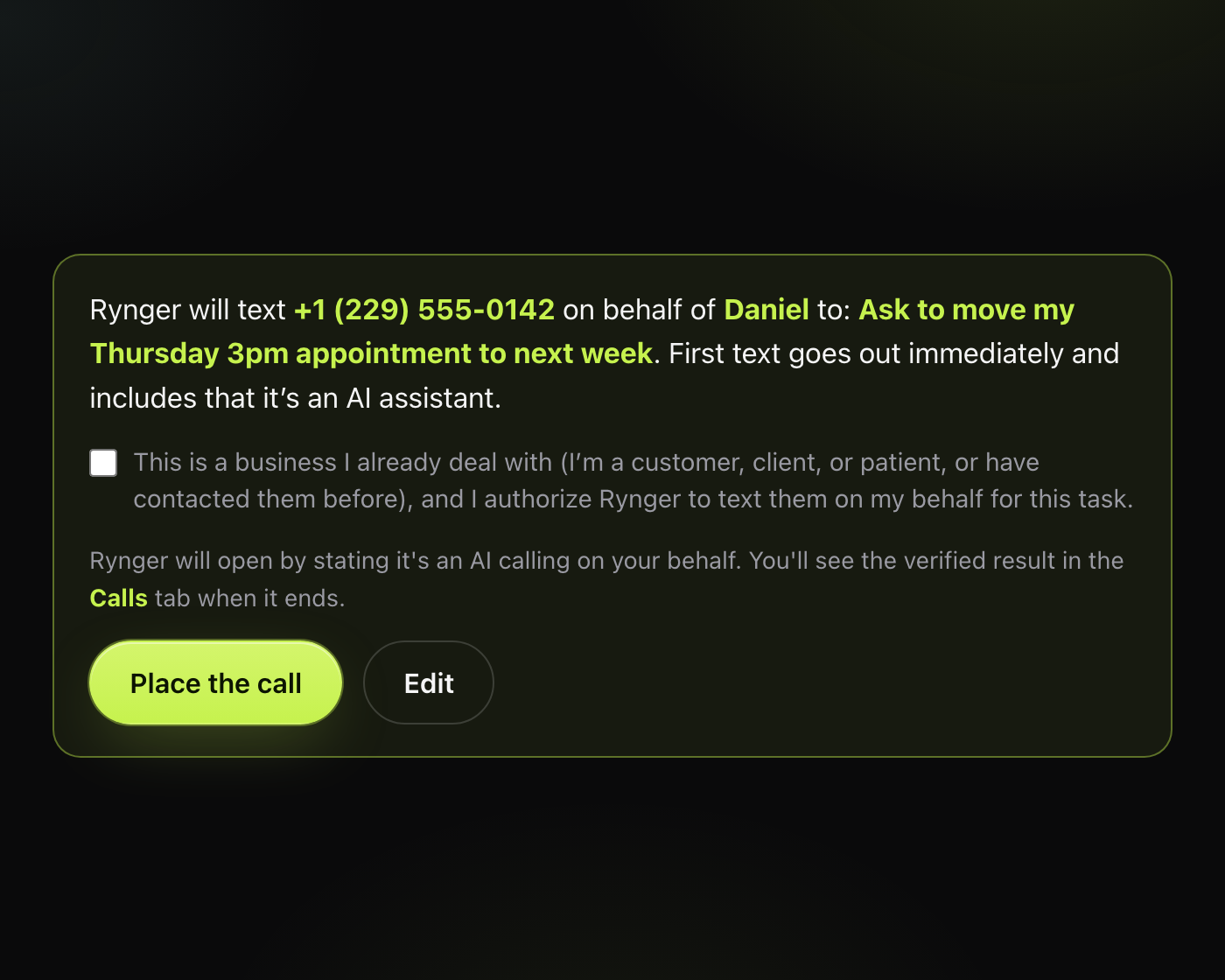
The same step, as selectable text (exact copy)
Identical wording to the screenshot above, reproduced as text:
Rynger will text (229) 555-0142 on behalf of Daniel to: ask to move Thursday’s 3pm appointment. First text goes out immediately and includes that it’s an AI assistant.
Start texting EditThe checkbox is unchecked by default. “Start texting” is refused until it is actively checked; the backend independently rejects any request submitted without the attestation.
Sample first message
Hi, this is an AI assistant texting on behalf of Daniel Kim. Daniel is a patient at your clinic and would like to move his Thursday 3pm appointment to next week — do you have any openings? Reply STOP to opt out.
Program disclosures
- Message frequency varies with the account holder’s use.
- Message and data rates may apply.
- Reply STOP to cancel at any time; reply HELP for help.
- We do not sell or share mobile information, SMS opt-in data, or phone numbers with third parties or affiliates for marketing (see the Privacy Policy).
- Full texting terms: Terms of Service, “Calls, texts, recording & consent.”
Contact
Questions about this flow: hello@rynger.ai. Sparkvern LLC, 2104 House Ave, Cheyenne, WY 82001, USA.